Local projects
Autosave, switch projects and recover recent versions.
 Idam3D
Beta
Idam3D
Beta
Browser-based 3D creation
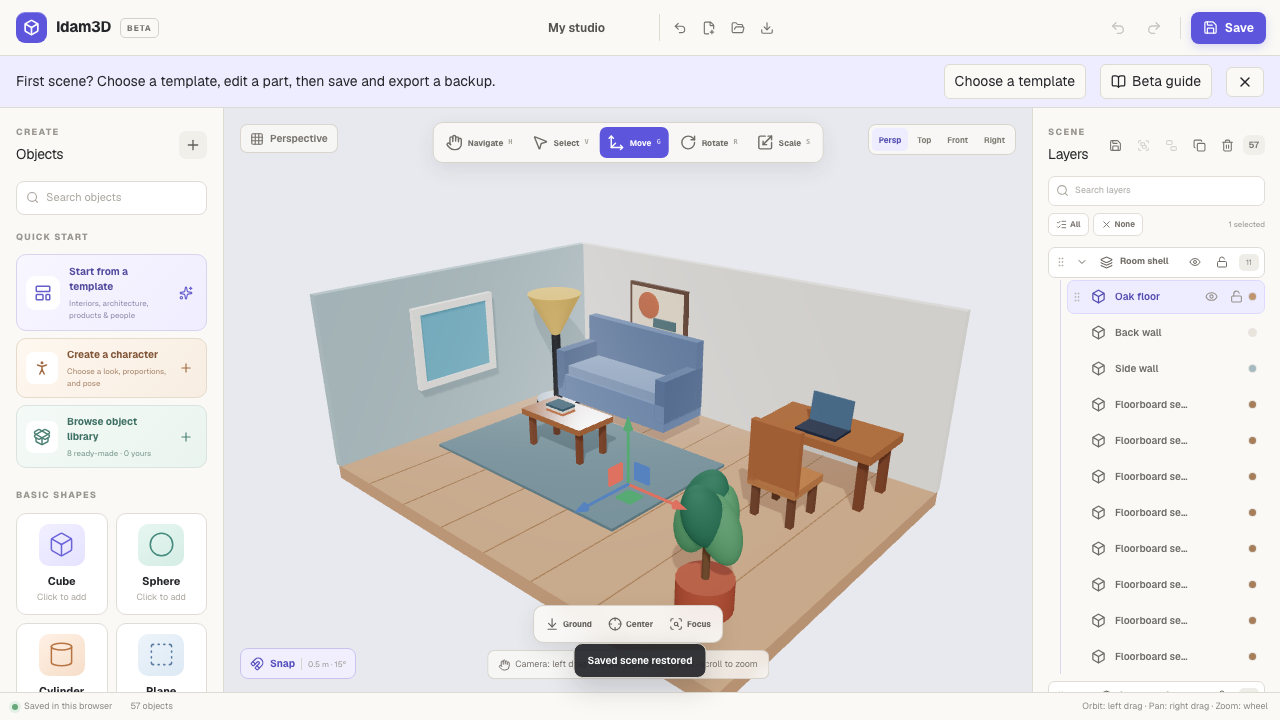
Build rooms, products, characters and complete scenes in an editor designed to feel approachable from the first click. Model, reuse and animate objects without creating an account.
No account required · Your scenes stay in your browser
Editable scene
57 objects
Start with a sceneShowcase templates
Shape every detailModel & style objects
Keep your workAutosave, history & backups
Take it furtherGLB import & export
Built for the next edit
Shape the geometry, reuse connected parts and add motion while keeping the scene editable on your device.
Autosave, switch projects and recover recent versions.
Apply finishes and locally imported image textures.
Create profile extrusions and soften edges with bevels.
Reuse objects while keeping geometry and appearance in sync.
Keyframe position, rotation and scale on a simple timeline.
One canvas, many directions
Idam3D brings scene building, object editing and reusable starting points into one approachable workspace.
01
Block out rooms, homes, cafés and interiors from editable pieces.
Interiors · Architecture
02
Arrange forms, materials and lighting for clear product concepts.
Concepts · Presentations
03
Build a person, adjust proportions and place a pose in your scene.
People · Story scenes
From blank canvas to portable scene
Start quickly, learn by making, and keep an editable copy of your work as you go.
Try it in the editorOpen a furnished showcase, a basic example or an empty scene.
Model and style objects, create linked copies, then add transform keyframes when the scene needs motion.
Keep an editable backup, export a static GLB, or capture a PNG.
Your work stays yours
Idam3D currently has no accounts, cloud saves, analytics or public gallery. Projects, recovery versions and imported models stay in your browser unless you choose to export and share them.
Idam3D public beta
Open Idam3D in a modern desktop browser with WebGL and start with a scene that is ready to shape.
Open Idam3D